- AI automatic subtitles rely on speech recognition. The software transcribes the audio, splits the text into blocks of one or two lines, then aligns it with the image.
- Premiere Pro, DaVinci Resolve Studio, YouTube, LinkedIn, TikTok and Instagram include this function. YouTube asks users to check and correct passages that were transcribed incorrectly.
- An SRT or VTT file remains editable and can be switched off at will. Burned-in subtitles display on any player, but each correction requires a new export.
- Proper names, jargon, punctuation, homophones, numbers and changes of speaker are among the errors to look for during proofreading.
- The charter of the CSA, now Arcom, limits subtitles to two lines for pre-recorded programmes. It allows 12 characters for one second, up to 60 for four seconds.
- Subtitling is not a general obligation. Article 47 of the 2005 law covers public bodies and large companies. The threshold is set at 250 million euros of average turnover in France.
AI automatic subtitles rely on speech recognition. The software transcribes the audio track, splits the text into short blocks, then aligns each block with the image. Premiere Pro, DaVinci Resolve Studio, YouTube, LinkedIn, TikTok and Instagram all include this function.
YouTube asks users to always check its automatic captions and to correct any passages that were transcribed incorrectly. Proper names, industry jargon and punctuation need particular attention.
The subtitles are then delivered in one of two forms. A separate file (SRT, VTT) is switched on at the viewer’s choice. Burned-in text, on the other hand, stays fixed in the image. In an AI video production, this stage takes place during editing, before the different formats are exported.
How AI generates automatic subtitles in 3 steps
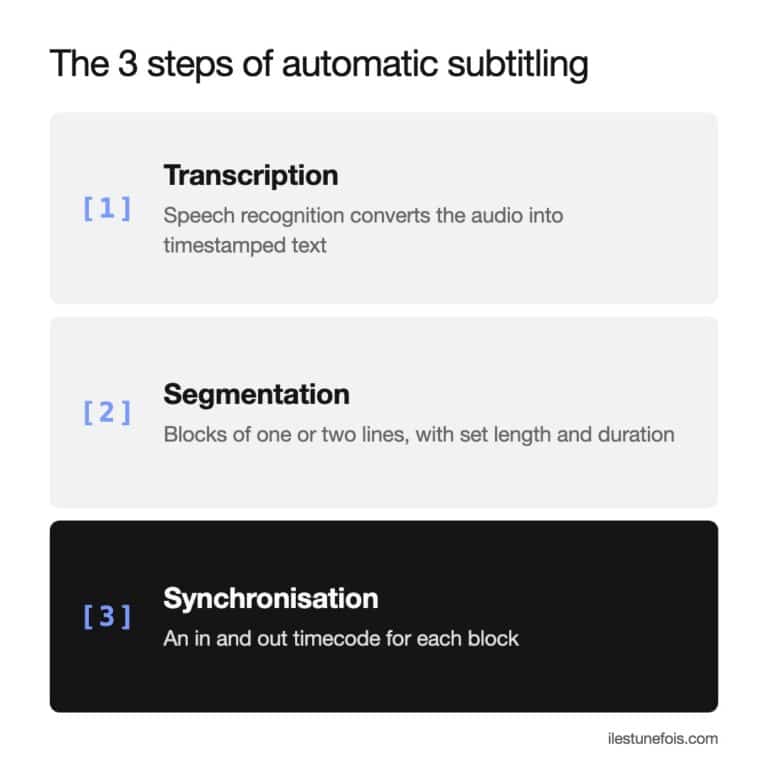
Whatever the tool, a subtitle generator carries out three operations in sequence.
Transcription by speech recognition
The speech recognition model converts the video’s audio into text. It attaches timestamps to the text, that is, the exact position of each word or group of words in time. Its accuracy depends on the sound. YouTube lists accents, dialects, background noise and mispronunciations among the causes of errors.
Splitting into subtitles
The text is then split into blocks of one or two lines. In Premiere Pro, the “Create captions” dialog box sets the line length in characters. It also sets the duration of each block, the gap between two captions and their style.
Synchronisation with the image
Each block receives an in and out timecode, calculated from the timestamps. A slight offset may appear after a cut or a silence. It is corrected by moving the block on the caption track.
These three steps produce subtitles in the original language. Translating them into another language adds a step, described in the article on AI video translation.
Automatic subtitling tools documented by their publishers
Each editing software publisher or platform includes its own generator. Software and platforms differ mainly in how much control they leave to the user.

| Tool | Documented function | Output |
|---|---|---|
| Adobe Premiere Pro | Automatic transcription on import, then creation of captions from the transcript | Burned-in captions, embedded in the file or as a separate file (SRT, STL, SCC) |
| DaVinci Resolve Studio | Transcription of clips to create subtitles (a feature of the paid version) | Subtitles in the final video or SRT, VTT, TTML files |
| YouTube | Automatic captions by speech recognition, in dozens of languages, editable in the YouTube Studio editor | Published directly on the video |
| Automatic captions, with an option to review them before display | Displayed on the published video | |
| TikTok, Instagram | Captions generated by speech recognition | Displayed on the published video |
On YouTube, available automatic captions are published directly on the video. LinkedIn, by contrast, lets you review them before they are displayed, in several languages including French.
YouTube also sets out the limits of its tool. Captions may not be generated for a video that is too long or has poor audio quality. Several people speaking at the same time can also prevent them. Other uses of AI are described in the article on AI video editing.
SRT file, VTT file or burned-in subtitles: two ways of distributing
Subtitles are delivered either alongside the video or within the image.
The separate file, switched on by the viewer
The SRT and VTT (WebVTT) formats are text files. They list each subtitle with the timecodes at which it appears and disappears. YouTube accepts both formats, among others. The file can still be edited after the video is online, without exporting the video again.
Burned-in subtitles, fixed in the image
Premiere Pro calls text rendered directly into the video file “burned-in captions”. It displays on any player, with no settings required. In return, it can no longer be switched off, and any correction requires a new export.
On social media, on-screen text also serves videos watched without sound. Facebook told its advertisers as early as 2016 that most video ads in the mobile feed were watched without sound. Its internal tests then measured an average 12% increase in viewing time for captioned video ads. These conventions specific to social video on social media (in French) weigh on the choice of format.
Proofreading AI-generated subtitles: the errors to look for
The errors in automatic subtitles fall into a few groups.
- Proper names: names of company heads, brands or products transcribed phonetically.
- Jargon and acronyms: industry terms replaced by a common word that sounds the same.
- Punctuation: sentences without commas, questions without a question mark.
- Homophones: in English, “their” and “there”, or “its” and “it’s”.
- Changes of speaker: two voices merged in the same block, without a dash.
- Numbers: amounts, dates and percentages misheard or written out in words.
Non-speech sounds raise another problem. Apart from special cases, such as YouTube’s sound labels in English, speech recognition transcribes speech only. Laughter, music or noises that explain the action belong to subtitles for the deaf and hard of hearing. They are added by hand during proofreading.
Premiere Pro also lets you find and replace a term throughout the transcript, before the captions are created.

My view as a producer
David Baudry, founder and art director of Il Est Une Fois
Automatic transcription helps me in the edit. But a subtitle is still text on screen, in the same way as a title. A typo in the name of a company head or a product is noticed immediately, and it stays attached to the film. For me, the machine prepares the work; segmentation and proofreading remain an editor’s job.
Legibility: the benchmarks of the CSA subtitling charter, now Arcom
In France, the charter on subtitling quality provides benchmark figures. Signed in 2011 under the aegis of the CSA, now Arcom (the French audiovisual and digital communication regulator), it covers television subtitled for deaf and hard-of-hearing people.
| Display time | Number of characters |
|---|---|
| 1 second | 12 characters |
| 2 seconds | 20 characters |
| 3 seconds | 36 characters |
| 4 seconds | 60 characters |
The charter limits subtitles to two lines for pre-recorded programmes. It allows a 20% tolerance on these reading times. Line breaks follow units of meaning: in the charter’s French example, “Il déteste / les jeunes filles” (“He hates / young girls”) rather than a break between “jeunes” and “filles” (“young” and “girls”). A dash marks each change of speaker. As far as possible, subtitles hide neither on-screen text nor the speakers’ lips.
The length and duration settings in editing software help to come close to these benchmarks.
Accessibility: what obligations apply to corporate videos?
Subtitling is not a general obligation for all of a company’s video content. It depends on the organisation publishing and the service concerned.
Article 47 of the 2005 law and the RGAA
Article 47 of the French law of 11 February 2005 applies first to public bodies and organisations delegated to run a public service. It also covers companies whose average turnover in France reaches 250 million euros. Their websites, intranets, extranets and applications must then be accessible, according to the criteria set out in the RGAA (the French general accessibility framework).
Criterion 4.3 of the RGAA requires synchronised subtitles for pre-recorded videos, where necessary and apart from special cases. The RGAA defines them as the text of the speech and of the sounds needed to understand the content. Only subtitles for the deaf and hard of hearing allow compliance. Raw automatic subtitles, limited to speech, may therefore remain incomplete with regard to this criterion.
The European Accessibility Act
Since 28 June 2025, Directive (EU) 2019/882 has extended accessibility requirements to listed products and services. These include e-commerce, banking services and passenger transport. E-books and access to audiovisual media services are also included. Microenterprises providing services are exempt. The text targets these specific services: it does not create an obligation to subtitle every communication video.
Subtitles in Il Est Une Fois productions
At Il Est Une Fois, subtitling takes place during editing, which we carry out in DaVinci Resolve and Premiere Pro. Our videos for social media are delivered in the formats suited to the target platforms, with or without subtitles. Our interviews and HR videos also include a subtitling stage in post-production.
On delivery, the master film is produced in 16:9, 9:16, 1:1 or 4:5 depending on the platforms. For corporate films, subtitled versions can be provided on request.
FAQ: AI automatic subtitles
How do you generate subtitles for a video automatically?
A speech recognition subtitle generator provides a first version, in editing software or on a platform. In Premiere Pro, transcription can start as soon as media are imported, with the “Auto-transcribe” option. The “Create captions from transcript” command then generates the track. Its accuracy varies: a full proofread is still needed before distribution.
What is the best free site for generating subtitles?
No official ranking names the best subtitle generator. The functions built into YouTube, LinkedIn or TikTok cost nothing for videos published on those services. For an internal or confidential video, uploading the file to a third-party site means entrusting it with your content.
How do you synchronise subtitles automatically?
Synchronisation relies on the timestamps produced by the transcription. On YouTube, automatic synchronisation starts from a transcript pasted or uploaded in the language spoken in the video. The platform advises against it for videos longer than an hour or with poor sound. In editing software, an offset is corrected by moving the blocks on the caption track.
Which software should you use to burn subtitles into a video?
Premiere Pro burns the active caption track directly into the video file. DaVinci Resolve exports subtitles within the final video, or as separate files in SRT, VTT or TTML format. Once burned in, the text can no longer be switched off: any correction means exporting the video again.
Subtitled videos ready for distribution?
Il Est Une Fois builds subtitling into the edit and produces the master film in all the required formats.
Sources:
- Charter on the quality of subtitling for deaf and hard-of-hearing people, Arcom (formerly CSA) (in French)
- RGAA 4.1.2, criteria and tests (Multimedia theme), DINUM (in French)
- 28 June 2025: a decisive step forward for the accessibility of products and services in Europe, handicap.gouv.fr (in French)
- Accessibility directive: exemption requests can be made online, Entreprendre.Service-Public.fr (in French)
- Use automatic captioning, YouTube Help
- Export caption tracks in Premiere, Adobe (in French)
- Updated Features for Video Ads, Facebook for Business (2016)
Article written by David Baudry
I founded Il Est Une Fois in 2004 and I am its artistic director, personally overseeing projects with high creative stakes. Trained in film and audiovisual production, I taught at the École Supérieure des Arts Visuels in Morocco, then worked in China and the United States. Since then, the agency has produced more than 100 videos a year, including for the French Ministry of Justice, ARCEP, CNRS, the Sorbonne and UNESCO, as well as campaigns broadcast on TF1 and M6. In 2019, our work won the award for Best European Cinematography at the Grand European Off Film Awards in Warsaw.